Pro Suite Indicator
Complete Trading Arsenal
Advanced TradingView indicator with dozens of classic technical tools and proprietary algorithms built by us. For expert traders and brokers who want to generate customized signals and build their own business.
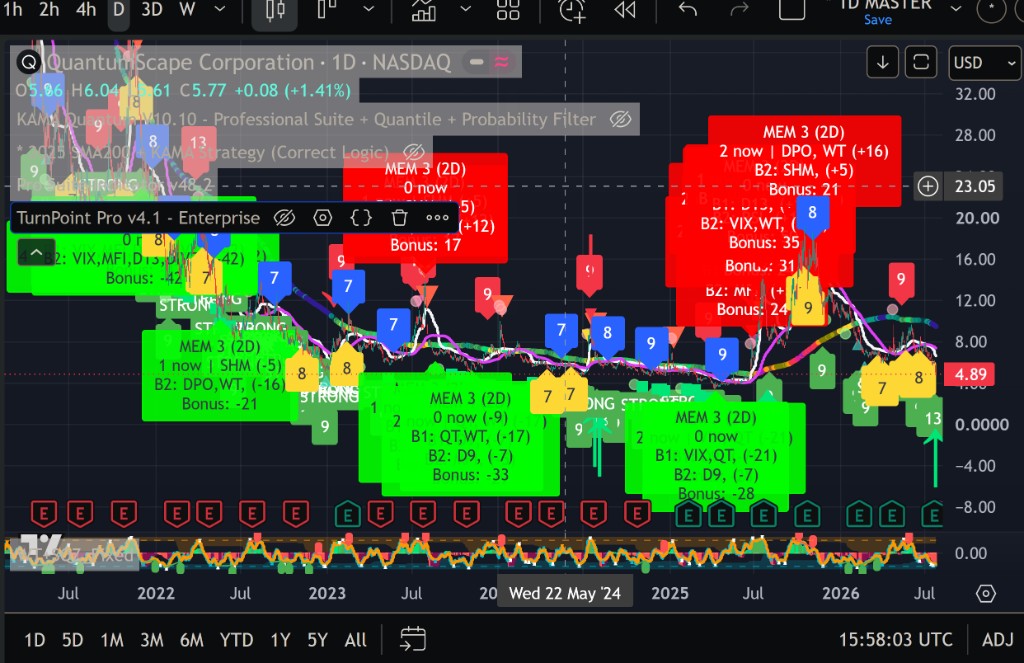
A complete ecosystem, a clear workflow
Everything you need for professional analysis and signal generation — from market reading to distribution.
Multi-tool analysis
Dozens of classic technical indicators such as RSI, MACD, Bollinger Bands, Stochastic, CCI, OBV and more, combined with proprietary algorithms in a single synchronized interface. Applicable on crypto, forex, stocks, ETFs, indices and commodities.
Customizable signals
Configure your own entry and exit criteria. Advanced filters on RSI, MACD, volumes, divergences and more. Customize every parameter to scan any ticker, any timeframe, and generate unlimited signals on your own terms.
Total control
You decide how to use it: set parameters, timeframes and strategies. Receive alerts on TradingView, email, mobile or anywhere via webhook. Resell signals to your clients — commercial license included.
From setup to signals
A workflow designed for professionals who want full control.
Indicator on chart
Pro Suite overlays multi-zone valuation, flags and oscillator context on any TradingView chart.
Live market reading
Read structure, momentum and signal labels in one view across stocks, ETFs and more.
Configure parameters
Customize presets, ranges, display options and alert mode from the Inputs panel.
Multi-setup analysis
Compare layouts and confluence stacks — the same engine, different reading modes.
Rich alert output
Trading alerts with quality stars, score gauge, indicators and AI-ready prompt links.
Access on request only
Send us your request and, if accepted, you receive TradingView access after payment.
What makes Pro Suite Indicator unique
Six proprietary tools that give you an edge no standard indicator can match.
Proprietary Multi-Zone Valuation
ProprietaryExclusive system with 14 color-coded zones to identify value extremes on any asset, timeframe, or market condition. Instantly see where the market is relative to its historical range.
Momentum Heat Map
Dozens of oscillators visualized simultaneously to read momentum strength at a single glance. No more switching charts or juggling multiple indicator windows.
Divergence & Convergence Scanner
Auto-detects divergences across MACD, RSI, Stochastic, CCI, OBV, Williams %R and more — with built-in functionality for calculating both divergence and convergence. Never miss a reversal signal again.
Exclusive Score System
ExclusiveProprietary algorithm aggregating dozens of data points — trend, momentum, volatility, volume and candle patterns — into a single 0-100 score to objectively evaluate market conditions.
Autonomous Preset Modes
Use ready-made presets for different markets and styles. Start quickly with structured configurations, then fine-tune every parameter to match your own workflow.
Advanced Alert System
Create alerts for TradingView, Telegram, webhook automation or your own signal distribution flow. Build a professional signal service around your custom criteria.
Built for traders, advisors and signal providers
Use it personally, professionally, or as the engine behind your own signal business.
Expert analysis
Designed for traders who want a complete technical analysis cockpit. Combine classic indicators and proprietary tools in one place. Set it once, trade effortlessly.
Personal trading
Use the generated signals for your own operations. You have total control over entries, exits, position sizing, and risk management. Perfect for experienced traders and financial advisors.
Resell signals
Build your business: sell signals to your clients, create a signal provider service, or integrate with fund management. Commercial license explicitly included — the output is yours to monetize.
Commercial license — what you can and cannot do
Allowed
- ✓Generate signals for your personal trading
- ✓Sell or share signals to your clients
- ✓Use in fund management with proper licensing
- ✓Create YouTube or blog content showing the indicator
- ✓Send signals from TradingView to clients via webhook
- ✓Build your own signal provider service
Forbidden
- ✕Share your TradingView access with others
- ✕Reverse-engineer or copy the source code
- ✕Resell access to the indicator itself
- ✕Remove watermarks or branding
- ✕Claim you created the indicator
Violation = immediate access revocation, no refund.
What you need to get started
Pro Suite is designed for traders who are serious about their craft.
Required
- ✓TradingView Pro+ minimum or Premium recommended
- ✓Basic technical analysis knowledge such as RSI, MACD and divergences
- ✓Computer or tablet for initial configuration
- ✓1–2 weeks to fully master the tool
Not required
- —Programming skills
- —Advanced mathematics knowledge
- —Professional trading experience, useful but not mandatory
You can view signals on mobile, but parameter configuration requires a desktop or laptop. Once set up, you can monitor from any device.
On request only
Pro Suite is not sold self-serve. Send your request via email or the Support form: we review your use case (personal trading, signal provider, Pro desk). If accepted, invite-only TradingView access after payment. Tailored pricing — commercial license included.
No public price list: each proposal is defined based on profile and intended use.
Email support@abeautifulmind.ai or use the form on the Support page.
Frequently asked questions
How long does it take to learn Pro Suite?+
Basic usage: 1–2 hours. Intermediate: approximately 1 week. Advanced: 2–4 weeks for backtesting, optimization, and developing your personal edge. Priority support is included to help you get started quickly.
Can I use it on multiple devices?+
Yes. Access is tied to your TradingView account, so you can log in from any device. However, you cannot share your access with other people. Each subscription covers individual use only.
What happens if I cancel my subscription?+
Your TradingView access is removed at the end of the billing period. You keep the knowledge and configurations you built, but the invite-only indicator will no longer be available until you reactivate.
Can I resell signals generated by Pro Suite?+
Yes. The commercial license explicitly allows you to generate and resell signals to your clients. You cannot resell access to the indicator itself, share your TradingView access, or claim ownership of the underlying code.
Is this a fully automated trading bot?+
No. Pro Suite Indicator is a TradingView analysis and signal-generation tool. For automated execution, you can connect its alerts to TradeLink Bridge.
Does it work with any asset?+
Yes. It can be used on crypto, forex, stocks, ETFs, indices, commodities and other TradingView-supported instruments. Result quality depends on your configuration, timeframe, liquidity, and market conditions.
Do I need to know how to code?+
No. You do not need programming skills. The tool is configured through TradingView settings, alerts and parameters. However, technical analysis knowledge is recommended to use it properly.
Is profit guaranteed?+
No. Pro Suite Indicator is a technical analysis tool, not financial advice and not a guarantee of profitability. You are responsible for backtesting, risk management, position sizing and how you distribute or use the signals.
Risk disclaimer
Past performance does not guarantee future results. Trading forex, cryptocurrencies, stocks, and derivatives carries a high level of risk and may not be suitable for all investors. Pro Suite Indicator is a technical analysis tool that provides data-driven insights, not financial advice or guaranteed profitable signals. Before deciding to trade, you should carefully consider your investment objectives, level of experience, and risk appetite. The commercial license grants rights to the signals you generate, but does not imply any warranty of profitability for you or your clients.
Build your trading edge
Tailored access for professionals
Commercial license included. No public checkout — request access and we'll define setup and pricing together.
Request access